SPFx: Richtext webpart with reusable content and placeholder resolving function for user profile properties

I am Sergej and I am a Software Architect from Germany (AURUM GmbH). I have been developing on Microsoft technologies for more than 14 years, especially in SharePoint / Microsoft 365. With this blog, I want to share my knowledge with you and also improve my English skills. The posts are not only about SPFx (SharePoint Framework) but also about tips & tricks around the M365 world & developments of all kinds. The posts are about TypeScript, C#, Node.js, Vue.js, Visual Studio/ VS Code, Quasar, PowerShell, and much more. I hope you will find some interesting posts. I would also be happy if you follow me. Greetings from Germany Sergej / $€®¥09@
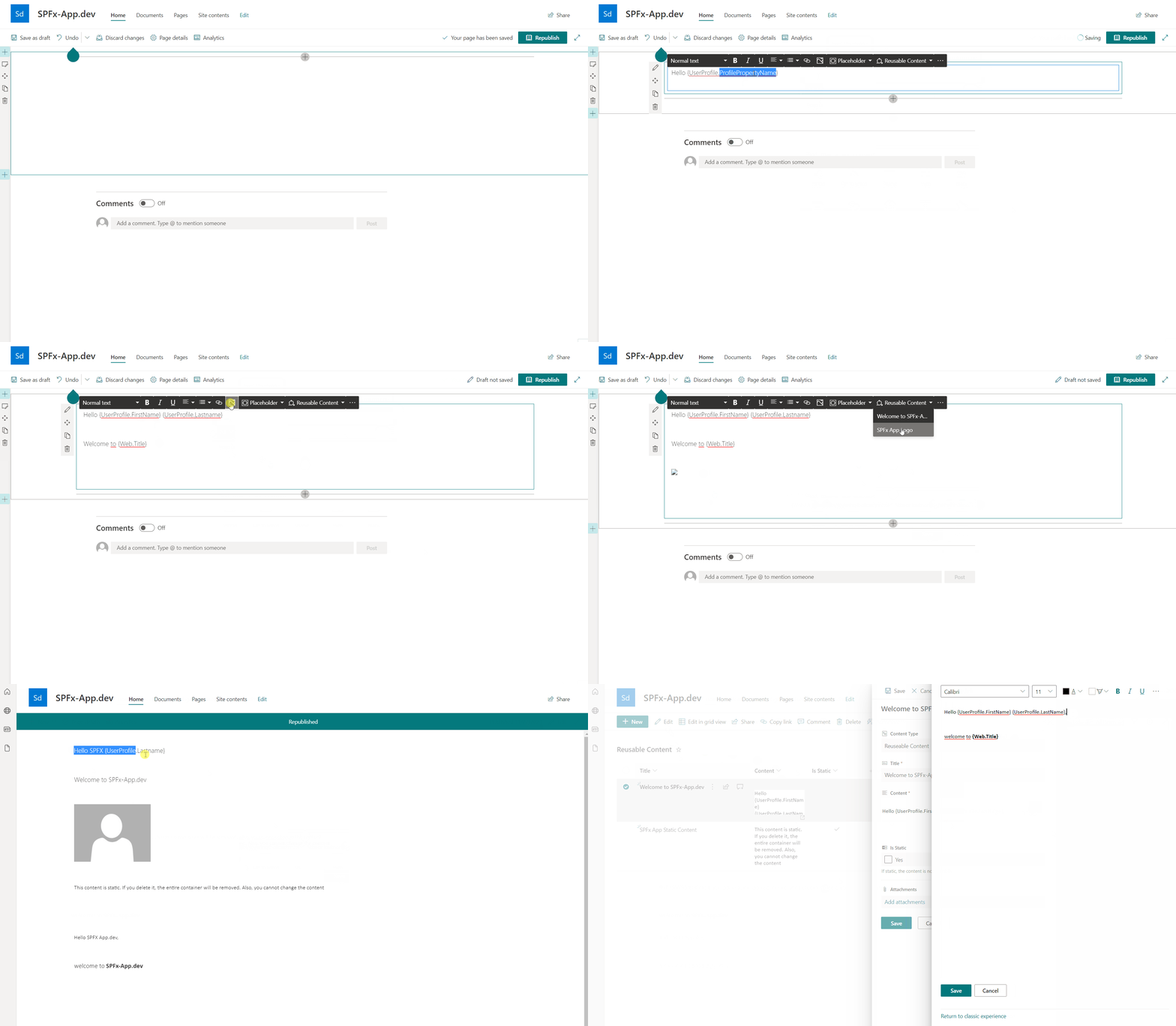
I have created an SPFx WebPart (for SharePoint Online) that uses the PnP Richtext Control as a base. I made a few customizations to display more items in the toolbox. The idea behind this web part is to allow the user to insert placeholders, which are then replaced in display mode. There are the following placeholders:
{Web.Url}
{Web.RelativeUrl}
{Web.Title}
{Site.Url}
{UserProfile.ProfilePropertyName}
Very dynamic and helpful is {UserProfile.ProfilePropertyName}. This can be used to display the properties of the currently logged in user, e.g. to greet him. All user profile fields can be used by (internal) fieldname, where all characters that are not a-z are replaced by an empty text (''). So SPS-JobTitle becomes SPSJobTitle. For example: {UserProfile.SPSJobTitle}
In addition, I have included a well-known feature from SharePoint Publishing (Classic), which does not exist in this way in Modern. The Reusable content. You can define content in a list and it will be displayed in the web part. If the text is not marked as "static", it can even be modified. So schaut dann das Resultat aus:
You can download the solution here and install it on your tenant. The code is stored in this repository.
Update March 2022
With the new release (v1.1.0.0) is it possible to configure the greeting text depending on the time (e.g. 0-12 am "Good morning", 12-16 pm "Good afternoon" etc.). To resolve the greeting text, insert {Greeting} as a placeholder. Also, you can insert the web part into a full-width section and the web part supports theme variants.
I would appreciate feedback.
Happy coding ;-)
$€®¥09@